
Partner rewards are store vouchers — not bank/PayPal payouts. When a partner redeems a confirmed balance, PRO generates a WooCommerce coupon / shopping voucher (validity configurable). Do not promise cash withdrawal.
The program is aimed at promoting campaign / promotional products, not a whole-catalog affiliate network. Partners must be activated (not every registered customer is a Partner by default).
The Partner program lets you recruit promoters to help reach discount thresholds faster. PRO feature: requires an active license. When the license expires, new referral clicks and attribution stop; commissions already attributed and confirmed balances can still be settled; the Partner Area stays readable. See Chapter 4 §4.4.
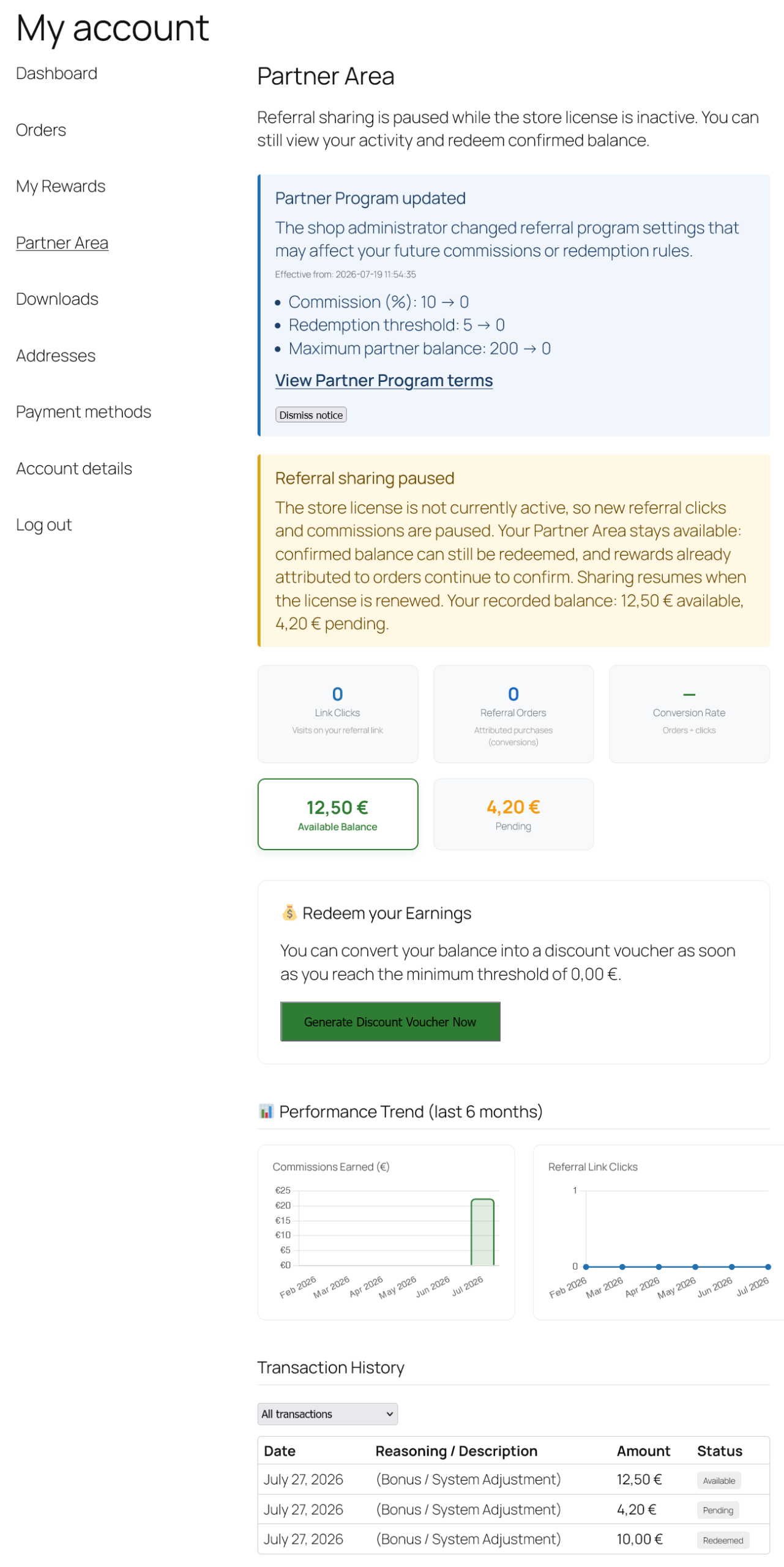
5 - Partner Area: referral sharing paused (license inactive)5.0 Activation
Enable the module under WooCommerce → Community Pricing → Referral & Partner → Configuration, checking “Enable Referral Module”.
Note, these are two separate options: enabling the Referral module (click tracking, commissions, partner dashboard) is independent from enabling the Catalyst Widget (the floating recruitment bubble, see §5.2). You can keep the module active without showing the floating widget (using only the recruitment shortcode), or customize the widget texts even while the module is off.
5.1 Commission Configuration
Define the commission percentage. Note: Commission is calculated on the actual price paid (post-discount) on community promotion order lines only (non-promo lines in a mixed cart are excluded). Product promo setup: Chapter 3. Eligible order rules: Chapter 2.
Each partner’s personal link uses an opaque code in the format ?ref=WCCP-XXXXXXXX (eight alphanumeric characters after the WCCP- prefix — not the WordPress username). Partners copy this link from the admin registry or their Partner Area. On first visit a cookie is stored (configurable duration, 30 days by default), so the order is still attributed to the partner even if the customer completes the purchase in a later session. A partner cannot earn commission on their own purchases (anti-self-referral protection).
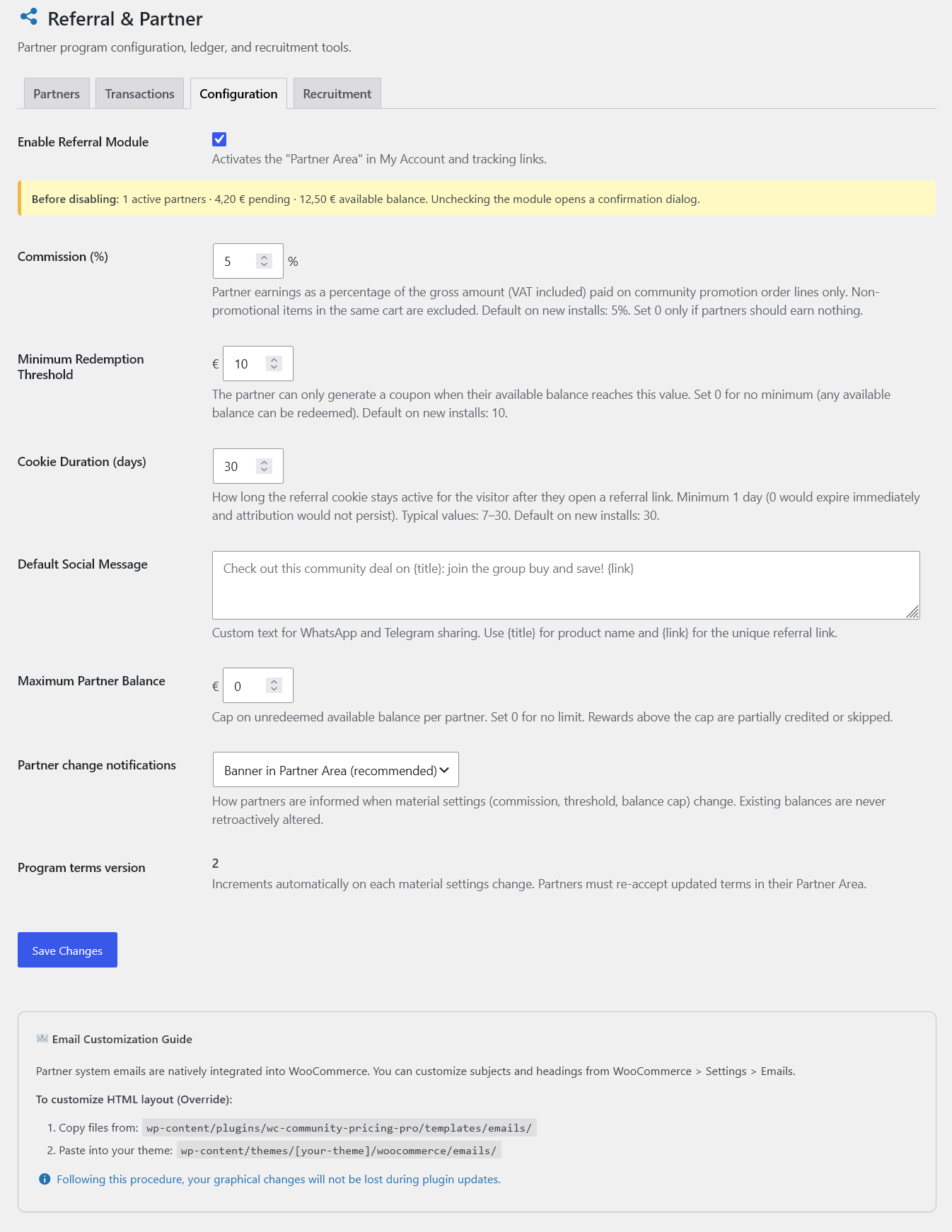
5.1 - Partner commission and redemption settings5.2 Catalyst Widget
The Catalyst Widget is a floating “bubble” that invites customers to become partners. Customize the text, icon, and messages (panel heading, description, button text) to match your brand. As an alternative (or in addition) to the floating widget, you can place the recruitment module anywhere on your site with the [wccp_partner_recruitment] shortcode.
Active partners also see a social share bar (WhatsApp, Facebook, copy link) directly on the product page, with a customizable message that automatically includes the product title and referral link.
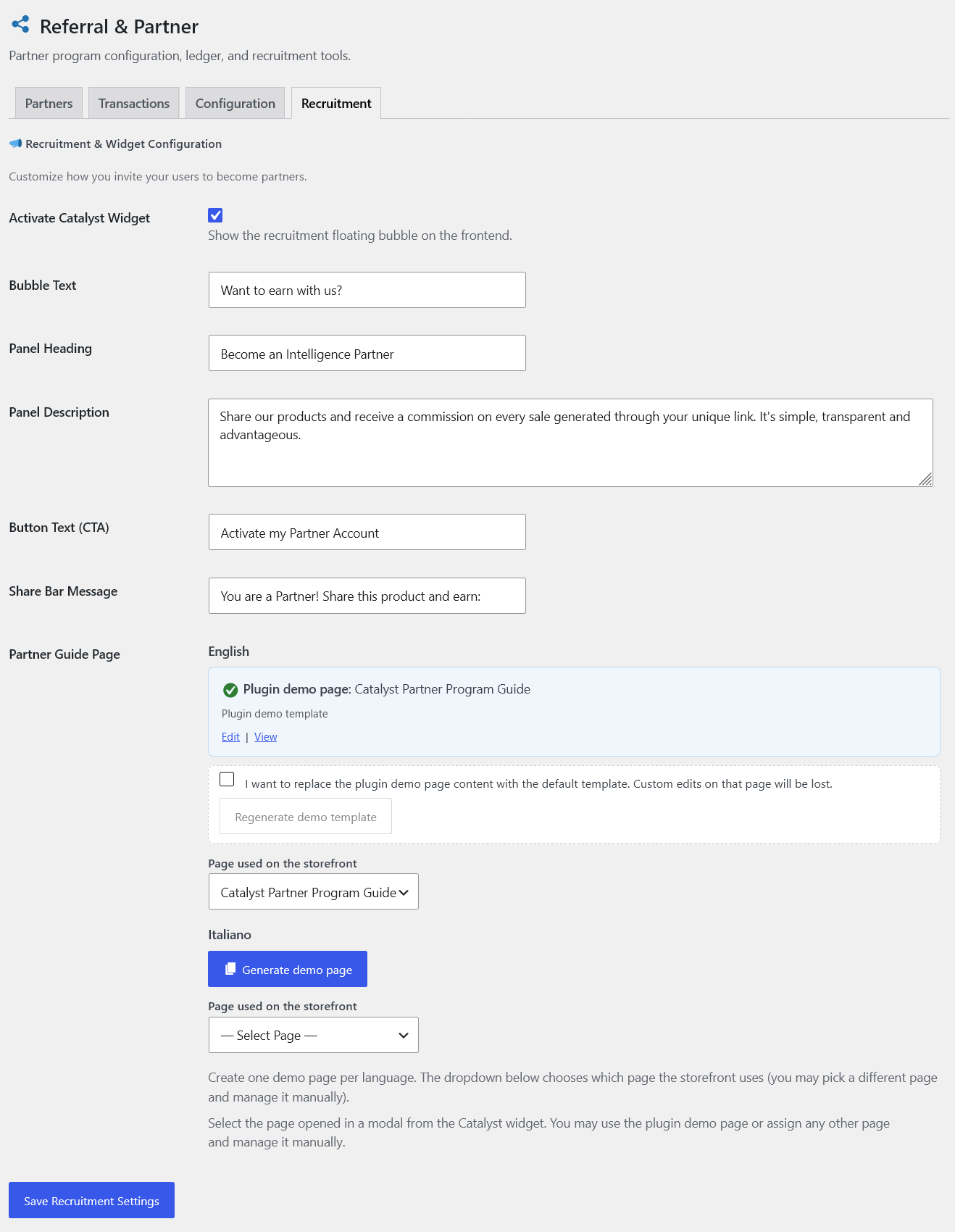
5.2 - Catalyst Widget customization options5.3 Partner Dashboard
After clicking “Become a Partner” in the widget, the user is granted a dedicated role and gains access to a private dashboard under My Account → Partner Area, which includes:
- Interactive charts — monthly earnings trend (last 6 months) and clicks/visits received from their link.
- Transaction history — paginated table with a status filter: Pending, Confirmed, Redeemed.
- Balance and redemption — once the configured minimum threshold is reached, the “Generate Discount Voucher” button instantly converts the confirmed balance into a WooCommerce coupon (180-day default validity, configurable).
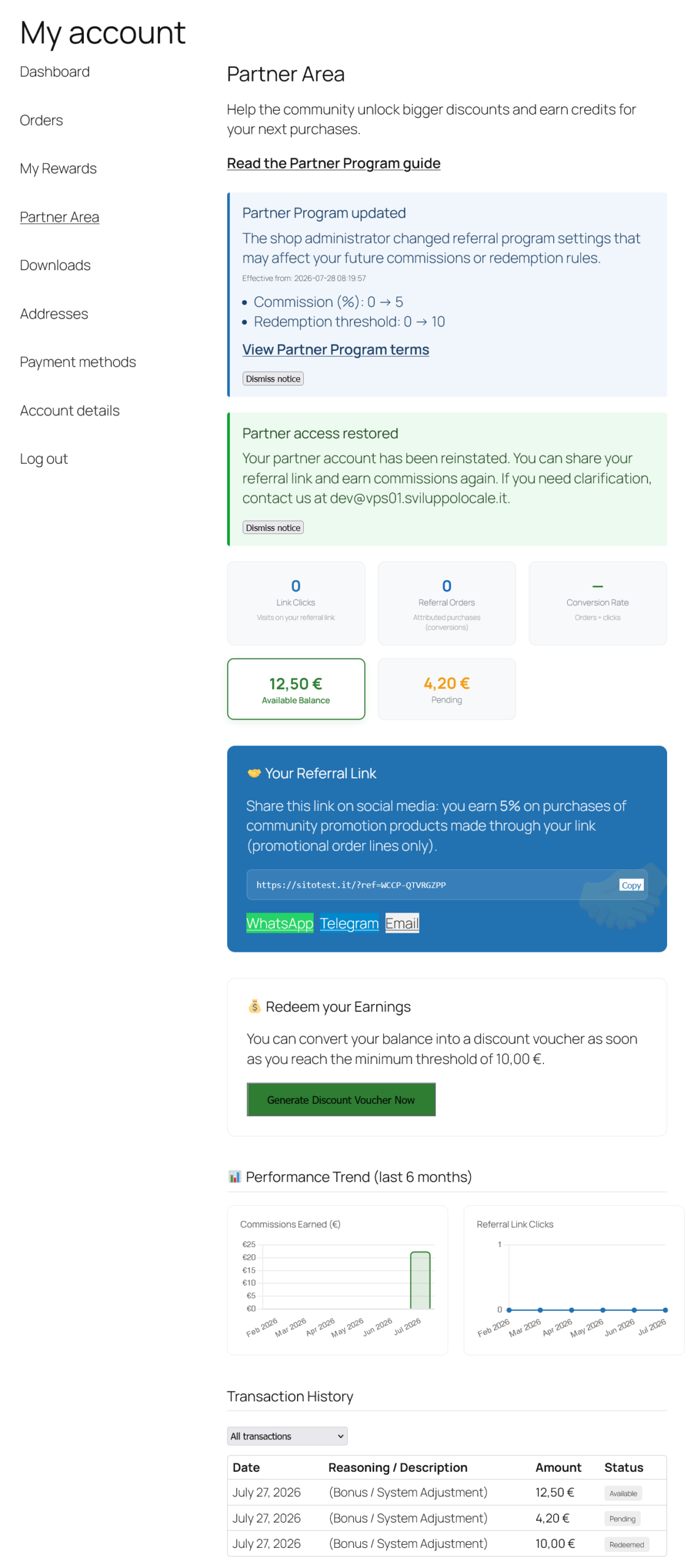
5.3 - Partner Area dashboardThe Partner Area header always surfaces a link to the Partner Program guide (or a clear “not available yet” message if the shop has not published it).
5.4 Partner Guide Page
Same model as Legal Information Page (v2.6.3+).
Under WooCommerce → Community Pricing → “Referral & Partner” tab → Recruitment, configure the page opened in a modal from the Catalyst Widget:
- Plugin demo page — created with Generate demo page (one per language with Polylang).
- Page used on the storefront — chosen from the dropdown; you may assign a different page and manage it manually.
- Regenerate demo template — affects only the registered demo page, with a confirmation checkbox.
Required when Referral is ON: generate or assign a Partner Guide page. Until it is published, WordPress shows an admin warning and the Partner Area keeps a visible “guide not available” notice instead of hiding the link. Shop managers also get a settings deep-link.
Same screenshot as §5.2 — scroll to the Partner Guide Page block (demo status, storefront dropdown, regenerate).
5.4 / 5.2 - Recruitment: Catalyst Widget + Partner Guide page controls5.5 Transaction Ledger (Admin)
Under Referral & Partner → Transactions (dedicated sub-nav from v2.9.10+; toolbar aligned to the Partner Registry from v2.9.13) you get the commission ledger:
- Transaction Ledger — filterable by partner name/email and status, sortable by date and amount, with a direct link to the source order for each row.
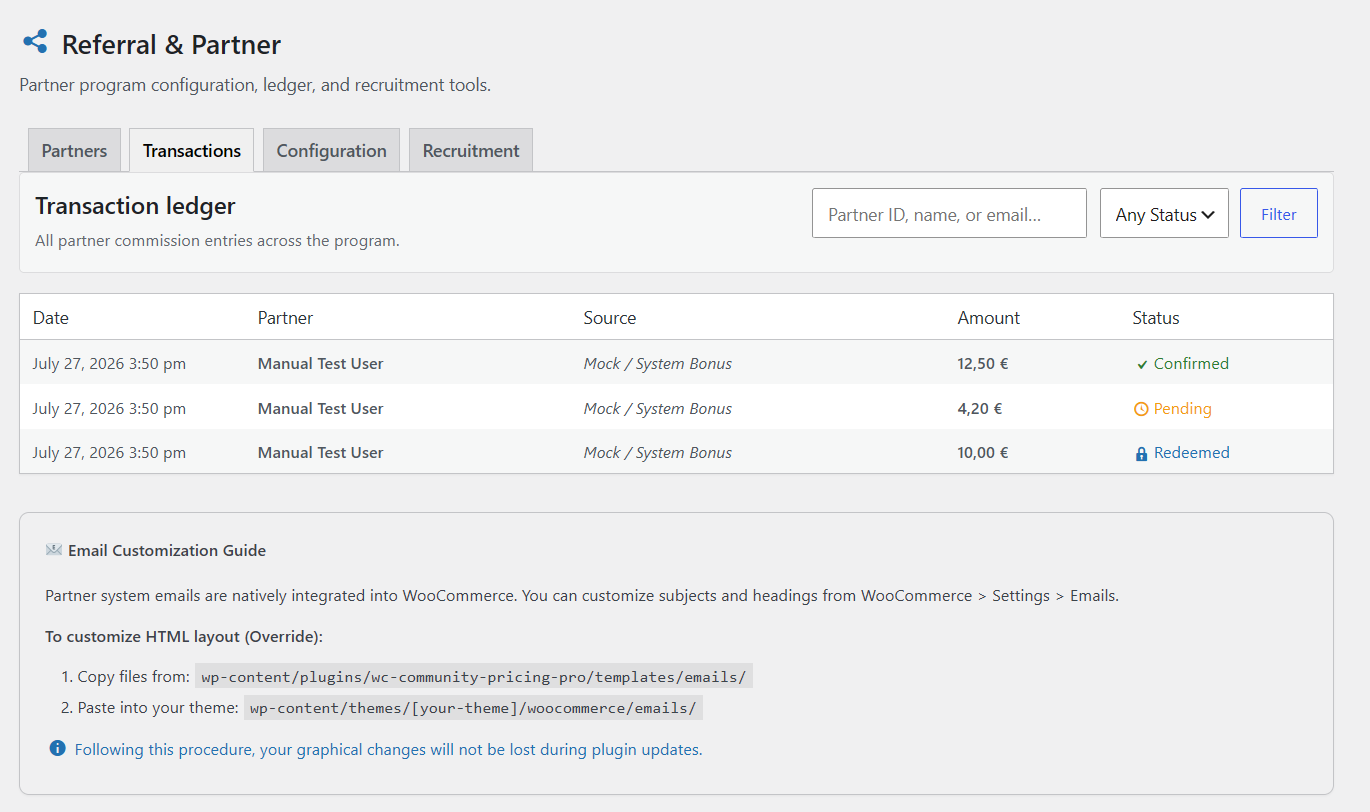
5.5 - Admin Transaction Ledger5.6 Automatic Email Notifications
The system automatically sends 5 transactional emails using the official WooCommerce email template:
| Event | Recipient |
|---|---|
| Partner account activated | Partner (welcome email) |
| Order completed via referral | Partner (commission earned) |
| Balance crosses the minimum threshold for the first time | Partner (can redeem) |
| Coupon generated after redemption | Partner |
| A partner performs a redemption | Administrator (notice) |